
After learning that Codex is open source, I decided to explore its code and architecture to understand how it works behind the scenes. This is the first post in a series sharing what I learned.
A couple of fun facts: Codex is written in Rust, while Claude Code’s team chose TypeScript. I know very little about Rust, so I have to guess what a piece of code is doing from time to time, with help from CodeX itself. Another fun fact: Codex’s Rust core does not use the OpenAI Agents SDK; it implements its own agent loop.
Table of Contents
- The message we will follow
- 1 The message enters the core
- 2 What the session already decided: base instructions
- 3 Describing the world for this step
- 4 The user message joins conversation history
- 5 Preparing history for the request
- 6 Building the model request
- 7 A tool result, and the loop repeats
- 8 The full call tree
- What comes next
The message we will follow
We will follow commit c248f6d (September 29, 2026) and explore what happens inside Codex after you type a request into the Codex CLI, for example “Fix the failing test in src/parser.rs”. Our session uses gpt-6-sol, a workspace-write sandbox, approvals on request, and a repository whose AGENTS.md says “Run cargo test before finishing”; sections 3 and 6 render from those settings. The exact request always depends on the model, configuration, enabled extensions, and previous turns, so we will point out where those choices branch.
Here is the shape of the journey. Codex routes the message to a turn, describes the current world as context messages, records the user message, prepares the conversation history, joins the session’s base instructions and tool definitions, and builds a request whose layout depends on the model. The diagram shows that assembly path for one request; a turn repeats it after each tool call.
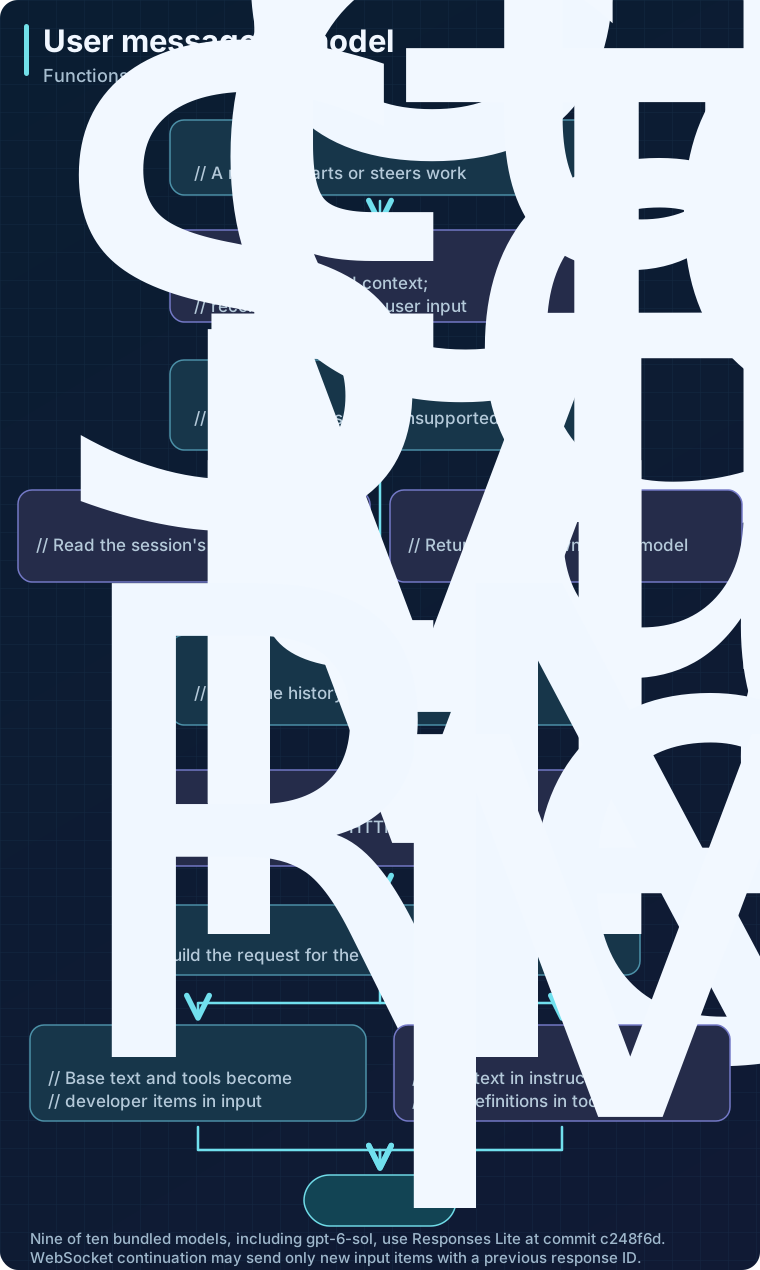
Open the request flow diagram at full size.
The function name heads each code step; the line beneath says what that function contributes. The three arrows into build_prompt represent prepared history, base instructions already selected for the session, and tool definitions. After ModelClient::build_responses_request, the two boxes show the model-dependent request shape. The diagram condenses input routing, optional compaction, context injections, and final transport preparation. Sections 1 through 7 walk through those pieces in the order they run; section 8 collects the whole call tree for reference.
1 The message enters the core
When we submit our message, the terminal UI acts as the client. AppServerSession::turn_start packages the conversation identifier, user input, and turn settings into a turn/start request. The app-server handles that request and passes the input to the core.
For the embedded CLI path, the app-server runs inside the CLI process. The client delivers typed requests through in-memory channels.
The app-server dispatches the request to its turn processor, whose entry method calls the inner handler. TurnRequestProcessor::turn_start_inner submits the input through CodexThread::start_or_steer_turn, which forwards it to the core’s input queue.
Inside the core, SessionIo::submit_turn_input wraps it in an Op::TurnInput and hands it to the submission loop. For StartOrSteer, start_or_steer either queues the input for a turn that is already running or, as in our case, starts a RegularTask. RegularTask::run calls run_turn, where our message arrives as TurnInput::UserInput.
SessionIo::submit_turn_input  session/mod.rs:999
└─ SessionIo::submit_with_id  session/mod.rs:984
   ↳ submission_loop  session/handlers.rs:420
      └─ turn_input::handle  session/turn_input.rs:205
         └─ start_or_steer  session/turn_input.rs:276
            ├─ Session::steer_input  session/turn_input.rs:632
            │  (queue accepted input for the active regular turn)
            └─ Session::spawn_task  tasks/mod.rs:271
               └─ Session::start_task  tasks/mod.rs:286
                  ↳ RegularTask::run  tasks/regular.rs:40
                     └─ run_turn  session/turn.rs:163
The submission channel and the spawned task connect the two groups; they run asynchronously.
run_turn does not record our message right away. It first checks whether history is already too large and, if so, compacts before recording the new user input. It then captures the step context: the model, the environment, and the tools this sampling step will use. Everything that follows reads from that snapshot.
Two inputs are already settled before our message is recorded: the base instructions chosen when the session started, and a description of the current world. We take them in that order.
2 What the session already decided: base instructions
Base instructions are the system-level text that tells the model what Codex is. They are selected once, when the session starts, and reused for every request in it. Session::spawn_internal checks these sources in order and uses the first one available:
- An explicit override from configuration, including
model_instructions_file. - Instructions saved with the conversation being resumed or forked.
- The selected model’s instruction template.
Here is that selection in the code. Code excerpts in this post are verbatim from the commit apart from trimmed indentation; highlighted lines are the ones the surrounding text discusses.
let base_instructions = config
    .base_instructions
    .clone()
    .or_else(|| conversation_history.get_base_instructions().map(|s| s.text))
    .unwrap_or_else(|| render_model_instructions(&model_info));
Our example has no override and is a fresh session, so it takes the third branch. render_model_instructions reads the selected model’s instructions_template. If a template is missing, it logs a warning and returns empty instructions.
Where the template comes from
The model manager bundles a catalog from models.json. Each of its ten model entries at this commit has a model_messages.instructions_template value. Depending on the provider and discovery settings, the manager can refresh the catalog from the model endpoint and cache it under the Codex home directory in a file named models_cache.json. The active template therefore depends on the selected model and the catalog available to that run.
For gpt-6-sol, the 18,992-character template begins:
You are Codex, an agent based on GPT-6. You and the user share one workspace, and your job is to collaborate with them until their intended goal is completely handled.The rest is structured as Markdown. These sections show the kinds of behavior the template establishes:
| Section | What it asks the agent to do |
|---|---|
# Personality and ## Writing style | Explain technical work clearly, like a colleague; use direct language and one point per paragraph. |
# When to ask the user for permission | Use existing authorization and complete reviewable work before asking for approval. |
# Autonomy and persistence | Finish the authorized task and make progress on reversible work without repeatedly asking for approval. |
# Working with the user | Treat new messages as steering the active task; continue from compaction summaries. |
## Intermediate commentary | Share progress while working and keep user-facing questions out of progress updates. |
## Final answer | Give a self-contained response with clickable file links and diagrams when they help explain the result. |
# Rules for getting work done | Prefer rg for searches, take care with shell commands, and run meaningful checks. |
# Using skills, # Apps (Connectors), # Plugins | Explain when and how to use the extensions made available to the session. |
One revealing instruction is about compaction: “Compaction does not end the task.” The same section tells the agent to continue from a summary without restarting finished work. This does not perform compaction by itself; the runtime compacts history, and the template tells the model how to behave afterward. A local compaction request also uses the session’s current base instructions.
Two files are easy to mistake for the standard template. The Markdown default.md prompt I first found backs BaseInstructions::default. An identical models-manager/prompt.md supplies fallback model metadata for an unknown model slug. Both are useful to read, but neither is the template for the ten listed models.
Adjustments on the way to the request
The selected text can still be trimmed. When no base-instructions override is set, personality none removes the template’s personality section. At request time, Session::get_prompt_base_instructions can also remove update_plan guidance from the request copy under specific settings. We will meet that function again in section 6.
Notice what the template does not contain: our working directory, the workspace-write sandbox, the AGENTS.md rule about cargo test, or the list of skills. Those details describe this session rather than Codex in general, and they arrive through a different path.
3 Describing the world for this step
Back in run_turn, the next call is Session::record_context_updates_and_set_reference_context_item. Its job is to make sure the model knows the current state of the session before it sees our message. It does this in two stages: first it builds a description of the world, then it decides how much of that description to send.
What goes into the world state
Session::build_world_state_for_step reads the step context and config and returns a WorldState: a list of typed sections, each describing one fact about the session. The main sources I found are:
- Instructions and operating mode. Codex can add configured or managed developer instructions, permission guidance, collaboration guidance, persistent-mode guidance from a separate catalog field, and V2 multi-agent guidance when applicable.
- Workspace and environment. Codex adds the loaded
AGENTS.mdinstructions. If environment context is enabled, it may also describe the working directory, shell, date, timezone, filesystem and network rules, and active subagents. - Skills and integrations. Depending on the setup, the model can receive an available-skills catalog or app, plugin, and deferred-tool guidance. Selected skill instructions take a different path that we cover in section 4.
- Extensions and special modes. Context contributors can add instructions. Codex can also add model-switch, token-budget, or realtime guidance when those features apply.
Two items in that list are not sections. Configured developer instructions and extension context contributions are added directly by the initial-context builder we reach below. Tool definitions are not part of the world state either. Codex builds the tool list available to the model separately, including built-in, MCP, and dynamic tools, and joins it to the request in section 6.
From sections to messages
Each section knows how to snapshot itself and render a fragment. A fragment carries a message role, an optional pair of wrapper tags, and a body; rendering is simply the open tag, the body, and the close tag. The “instructions and operating mode” sources all render as developer-role fragments, but their text comes from different places:
| Source | Wrapper tags | Where the text comes from |
|---|---|---|
| Configured developer instructions | none | developer_instructions in config.toml |
| Managed developer instructions | <managed_developer_instructions> | additional_developer_instructions from a managed config layer |
| Permission guidance | <permissions instructions> | sandbox and approval templates, with catalog overrides |
| Collaboration guidance | <collaboration_mode> | the model’s collaboration_modes catalog entry, else the mode’s own developer instructions, which are a bundled preset or custom text |
| Persistent-mode guidance | <persistent_mode> | the model’s persistent_instructions catalog field, else a bundled template |
| V2 multi-agent guidance | <multi_agent_mode>, plus an untagged role message | the model’s multi_agent catalog entry, else bundled constants |
“Catalog” here means text supplied by the model’s entry in models.json; “bundled” means defaults compiled into the binary. Codex keeps track of which one it used through a small ResolvedMessage type, because an empty catalog value means “suppress this message” rather than “use the default”.
For our example, the permission fragment is the one that matters most. With a workspace-write sandbox and approvals on request, it renders the sandbox template followed by the approval template, trimmed here:
<permissions instructions>
Filesystem sandboxing defines which files can be read or written. `sandbox_mode` is `workspace-write`: The sandbox permits reading files, and editing files in `cwd` and `writable_roots`. Editing files in other directories requires approval. Network access is restricted.

# Escalation Requests

Commands are run outside the sandbox if they are approved by the user, or match an existing rule that allows it to run unrestricted. ...

## How to request escalation

IMPORTANT: To request approval to execute a command that will require escalated privileges:

- Provide the `sandbox_permissions` parameter with the value `"require_escalated"`
...
</permissions instructions>
The AGENTS.md rule takes a different role. Codex renders it as a user-role context message, as this snapshot test shows:
# AGENTS.md instructions

<INSTRUCTIONS>
Run `cargo test` before finishing.
</INSTRUCTIONS>
So a project instruction and a developer policy can both reach the model, in different message roles. The role decides how they are grouped next.
First turn: full context
Our message starts a new thread, so there is no earlier context to diff against. record_context_updates_and_set_reference_context_item takes the full-injection branch and calls Session::build_initial_context_with_world_state. That function renders every section as if nothing came before, adds the configured developer instructions and any extension contributions, and sorts the fragments by role. The general cases are the last two arms of this match; the guarded arms above them pull out fragments that need their own message or a specific position:
for fragment in world_state.render_full() {
    match fragment.role() {
        "developer"
            if fragment.markers().0 == ModelSwitchInstructions::type_markers().0 =>
        {
            // New-model instructions must precede the rest of the developer context.
            developer_sections.insert(0, fragment.render_fragment());
        }
        "developer" if fragment.markers().0 == MULTI_AGENT_MODE_OPEN_TAG => {
            initial_multi_agent_mode = Some(fragment);
        }
        "developer"
            if fragment.markers().0 == ManagedDeveloperInstructions::type_markers().0 =>
        {
            managed_developer_instructions = Some(fragment);
        }
        "developer"
            if fragment.markers().0 == MultiAgentRoleInstructions::type_markers().0 =>
        {
            separate_developer_sections.push(fragment.render_fragment());
        }
        "developer"
            if fragment.requires_separate_message() && fragment.markers().0.is_empty() =>
        {
            separate_developer_sections.push(fragment.render_fragment());
        }
        "developer" => developer_sections.push(fragment.render_fragment()),
        "user" => contextual_user_sections.push(fragment.render_fragment()),
        _ => {}
    }
}
The message construction that follows turns each of those buckets into messages. build_rendered_message then turns each group into one ResponseItem::Message, with one content part per fragment. The resulting order is:
- One aggregated developer message holding the configured developer instructions, permission guidance, collaboration guidance, and most other developer fragments.
- One message each for fragments that require their own, such as the multi-agent role text and the token-budget hint.
- The multi-agent mode message.
- One aggregated user message holding
AGENTS.mdand the environment context. - The managed developer instructions, always last.
For our example, with permission and collaboration guidance enabled and no managed policy, the context recorded ahead of our message is:
developer  [ "<permissions instructions>…</permissions instructions>",
             "<collaboration_mode>…</collaboration_mode>", … ]
user       [ "# AGENTS.md instructions …",
             "<environment_context>…</environment_context>" ]
Those items go into conversation history through record_conversation_items, and the world-state snapshot is saved as the baseline for later turns.
Later turns: only the diff
The second time we send a message in this thread, the baseline exists, so the same function takes the other branch. It diffs the new world state against the stored snapshot and records only the sections that changed. Many sections render their change with a notice, for example “These AGENTS.md instructions replace all previously provided AGENTS.md instructions.” or “The previously provided AGENTS.md instructions no longer apply.”, so the model knows the earlier text is void.
The same diff runs before every later sampling step inside a turn through Session::record_step_world_state_if_changed. We will see it fire in section 7.
Switching models is one such change. The session keeps its original base text while ModelInstructionsState::render_diff adds the new model’s instructions in a <model_switch> developer message. Reading only the session’s base text would miss that update.
4 The user message joins conversation history
With the world described, run_turn can finally record what we typed. Two things happen first. build_skills_and_plugins collects turn-specific injection items, such as selected skill instructions, and turn-input contributors can add messages of their own. Codex records those items before the first model request. Our example mentions no skill by name.
Then run_turn checks and records the user’s input through run_hooks_and_record_inputs. The recording path turns our text into a message in conversation history. The conversion sets its role explicitly:
Self::Message {
    role: "user".to_string(),
    content,
    phase: None,
}
Source: ResponseInputItem::from_user_input.
History now holds the context messages from section 3 followed by our request. On later turns it also holds earlier assistant messages, tool calls and results, reasoning items, and updates to reasoning settings. User messages and tool results can contain text, images, or audio when the selected model supports them.
5 Preparing history for the request
History is the session’s record; the request needs a cleaned copy of it. For a regular sampling request, ContextManager::for_prompt delegates to for_prompt_annotated, which does the real work in two lines:
pub(crate) fn for_prompt(self, input_modalities: &[InputModality]) -> Vec<ResponseItem> {
    self.for_prompt_annotated(input_modalities)
        .into_iter()
        .map(ResponseItemEnvelope::into_item)
        .collect()
}

/// Returns normalized history envelopes for internal consumers that must retain metadata.
pub(crate) fn for_prompt_annotated(
    mut self,
    input_modalities: &[InputModality],
) -> Vec<ResponseItemEnvelope> {
    self.normalize_history(input_modalities);
    Arc::unwrap_or_clone(self.items)
}
ContextManager::normalize_history runs four repairs in order. The first two supply missing tool outputs and remove orphaned outputs that require a matching call; the last two replace unsupported images and audio in messages and tool outputs with text placeholders:
fn normalize_history(&mut self, input_modalities: &[InputModality]) {
    let items = Arc::make_mut(&mut self.items);

    // all function/tool calls must have a corresponding output
    normalize::ensure_call_outputs_present(items);

    // Paired outputs must have a corresponding call; named external outputs stand alone.
    normalize::remove_orphan_outputs(items);

    // strip images when model does not support them
    normalize::strip_images_when_unsupported(input_modalities, items);

    // strip audio when model does not support it
    normalize::strip_audio_when_unsupported(input_modalities, items);
}
These changes apply to the copy prepared for the request; persisted history is untouched. The request builder may also filter the reasoning-settings updates from that copy.
Our first request has a short history, so normalization finds nothing to repair. On a long thread, two more mechanisms shape what the model sees. When the configured compaction budget or usable context window is exhausted, Codex can compact before recording a new turn, as we saw in section 1, or between requests in a continuing turn. After summarizing compaction, a summary stands in for older turns. Local compaction retains user messages within a token budget; a message that does not fit, or that contains media, is rebuilt from its flattened text, truncated to the remaining budget, with images and audio dropped. Compaction is conditional; a new request does not imply the full earlier transcript is still present.
As a turn proceeds, Codex may also add new user input or hook context, time reminders, or budget reminders when their conditions apply. Those items enter a later model call, which is the loop we reach in section 7.
6 Building the model request
Three inputs are now ready: the prepared history, the base instructions from section 2, and the tool list. run_sampling_request retrieves the base instructions through get_prompt_base_instructions, the function from section 2 that can strip update_plan guidance, and calls build_prompt with the history and the step context. The highlighted lines are where the tool list joins the other two:
pub(crate) fn build_prompt(
    input: Vec<ResponseItem>,
    step_context: &StepContext,
    base_instructions: BaseInstructions,
) -> Prompt {
    let turn_context = &step_context.turn;
    Prompt {
        input,
        tools: step_context.tool_router.model_visible_specs(),
        parallel_tool_calls: true,
        base_instructions,
        output_schema: turn_context.final_output_json_schema.clone(),
        output_schema_strict: !crate::guardian::is_basic_session_source(
            &turn_context.session_source,
        ),
        cyber_access_program: turn_context.cyber_access_program,
    }
}
The Prompt enables parallel tool calls here; the final builder sets that request flag to false for Lite models.
ModelClient::build_responses_request converts that Prompt into a request. It first calls Prompt::get_formatted_input_for_request, which adjusts image-detail settings for the model. Then it chooses between two shapes based on the model’s use_responses_lite flag:
- Responses Lite: A developer item carrying the tool definitions and, when the base text is nonempty, a developer message carrying that text are prepended to
input. The top-levelinstructionsstring is empty andtoolsis unset. - Non-Lite: Prepared history stays in
input; base text goes ininstructionsand tool definitions go intools.
let (instructions, tools) = if model_info.use_responses_lite {
    // These prompt-only items are rebuilt on every request. Hash their visible payloads
    // within the thread so retries and resumed sessions preserve their identity.
    let prefix_namespace = Uuid::new_v5(
        &Uuid::NAMESPACE_OID,
        self.state.thread_id.to_string().as_bytes(),
    );
    let tools = if self.state.provider.capabilities().namespace_tools {
        create_tools_json_for_responses_lite(&prompt.tools)?
    } else {
        create_tools_json_for_responses_api(&prompt.tools)?
    };
    let mut prefix = vec![ResponseItem::AdditionalTools {
        id: Some(ResponseItemId::with_suffix(
            "at",
            Uuid::new_v5(&prefix_namespace, &serde_json::to_vec(&tools)?),
        )),
        role: "developer".to_string(),
        tools,
    }];
    if !prompt.base_instructions.text.is_empty() {
        let mut instructions = ContextualUserFragment::into(BaseInstructionsFragment(
            prompt.base_instructions.text.clone(),
        ));
        instructions.set_id(Some(ResponseItemId::with_suffix(
            "msg",
            Uuid::new_v5(&prefix_namespace, prompt.base_instructions.text.as_bytes()),
        )));
        prefix.push(instructions);
    }
    input.splice(0..0, prefix);
    (String::new(), None)
} else {
    (
        prompt.base_instructions.text.clone(),
        Some(create_tools_raw_json_for_responses_api(&prompt.tools)?.into()),
    )
};
At this commit, Lite is the common case. Nine of the ten bundled models, including our gpt-6-sol, set the flag to true; only gpt-5.5 sets it to false, and catalog entries that omit the flag default to false. After that choice, the builder assigns the request fields. The highlighted ones are the pair chosen above plus the parallel-tool-calls override:
let request = ResponsesApiRequest {
    model: model_info.slug.clone(),
    instructions,
    input,
    tools,
    tool_choice: "auto".to_string(),
    parallel_tool_calls: prompt.parallel_tool_calls && !model_info.use_responses_lite,
    reasoning: Some(reasoning),
    store: false,
    stream: true,
    stream_options,
    include,
    service_tier,
    prompt_cache_key,
    text,
    client_metadata: Some(client_metadata),
    access_programs: None,
};
For our Lite model, instructions and tools hold the empty and unset values described above, and input begins with the two developer items, followed by the context messages from section 3 and our user message from section 4.
This explains why AGENTS.md can contain instructions yet appear in input: Codex renders it as a context message, so it is part of history. Base text and tools follow the model’s request branch. The request also carries model, reasoning, tool-choice, and output-format settings outside the conversation. To know what any particular turn received, we would need to inspect its assembled request, including the selected branch, extensions, and current history.
There is one more distinction between the assembled request and what travels over the connection. ModelClientSession::stream chooses WebSocket when available or the HTTP Responses path, and both the WebSocket and HTTP branches call the same build_responses_request. On WebSocket, ModelClientSession::prepare_websocket_request checks whether the request extends the previous input and response without changing the other request settings. If it can reuse that response, the wire payload carries previous_response_id and only the new input items. Our first request has no previous response, so it goes out in full.
From this assembly path, I infer that Codex does not automatically send every file in a repository. Files the agent reads reach the model through added context or a user or tool message. Source: request input is prepared from conversation history.
7 A tool result, and the loop repeats
The model usually needs to look at the repository before it can answer, so its first response is likely a tool call, for instance a shell command that runs the tests or reads a source file. handle_output_item_done records that call and queues its execution. After the tool finishes, drain_in_flight records the result in conversation history. The result is a response item associated with the call, so the model can use its content in the next request. Source: tool output conversion.
That result may already be shorter than the tool’s original output. ContextManager::record_item_with_metadata applies a truncation budget to function and custom-tool outputs as they enter live history. A successful file read therefore does not guarantee the model receives the entire file.
The main run_turn loop then runs sections 3 through 6 again in miniature. It records any input we typed while the tool was running, reuses or re-captures the step context and tools, runs the world-state diff from section 3 so a changed sandbox or AGENTS.md reaches the model, and prepares history again. The history preparation call is below:
// Construct the input that we will send to the model.
let sampling_request_input: Vec<ResponseItem> = async {
    sess.clone_history()
        .await
        .for_prompt(&step_context.settings.model_info.input_modalities)
}
.instrument(trace_span!("run_turn.prepare_sampling_request_input"))
.await;
This is the point where a tool result, an accepted user steer, or a changed context message affects the next model call. On WebSocket, this second request is where the continuation from section 6 pays off: the payload carries the previous response ID and only the new items, in our case the tool result and anything recorded since.
The model’s follow-up flag and pending input determine whether another sampling step is needed. Once the model has read the file, edited it, run the tests, and written its final answer, neither requests continuation, and Codex runs Stop hooks before finishing. A hook can add a prompt and keep the loop going.
8 The full call tree
Here is the sampling path inside run_turn, in the order the sections above followed it. It includes initial context, user-message recording, history normalization, both transport choices, and a tool result. It condenses task wrappers, metadata preparation, error handling, and special modes. File references are relative to codex-rs/core/src/, except for protocol/src/models.rs and the transport calls marked codex-api:
run_turn  session/turn.rs:163
├─ run_pre_sampling_compact  session/turn.rs:1298
│  (if needed, compact before recording the new user input)
├─ Session::capture_step_context_with_required_mcp_servers
│  (session/mod.rs:3761; capture model, environment, and tools)
├─ Session::record_context_updates_and_set_reference_context_item
│  (session/mod.rs:4677)
│  ├─ Session::build_world_state_for_step  session/world_state.rs:40
│  └─ Session::build_initial_context_with_world_state
│     (session/mod.rs:4301)
│     (full context when needed; otherwise record changes)
├─ build_skills_and_plugins  session/turn.rs:1032
│  (collect turn-specific injection items)
├─ run_hooks_and_record_inputs  session/turn.rs:866
│  └─ record_pending_input  hook_runtime.rs:716
│     └─ Session::record_user_prompt_and_emit_turn_item
│        (session/mod.rs:4963)
│        └─ Session::response_item_from_user_input_with_image_positions
│           (session/mod.rs:3495)
│           └─ ResponseInputItem::from_user_input
│              (protocol/src/models.rs:2004)
├─ Session::record_conversation_items  session/mod.rs:3538
│  (record collected skill, plugin, or extension items)
├─ Session::record_step_world_state_if_changed
│  (session/mod.rs:3684; refresh context for this sampling step)
│  └─ Session::build_world_state_for_step  session/world_state.rs:40
├─ ContextManager::for_prompt  context_manager/history.rs:581
│  └─ ContextManager::for_prompt_annotated
│     (context_manager/history.rs:589)
│     └─ ContextManager::normalize_history
│        (context_manager/history.rs:933; repair call pairs, filter media)
└─ run_sampling_request  session/turn.rs:1612
   ├─ Session::get_prompt_base_instructions  session/mod.rs:1489
   ├─ build_prompt  session/turn.rs:1583
   │  └─ ToolRouter::model_visible_specs  tools/router.rs:137
   └─ try_run_sampling_request  session/turn.rs:2519
      ├─ ModelClientSession::stream  client.rs:2218
      │  ├─ ModelClientSession::stream_responses_websocket
      │  │  (client.rs:1835)
      │  │  ├─ ModelClient::build_responses_request  client.rs:885
      │  │  ├─ ModelClientSession::prepare_websocket_request
      │  │  │  (client.rs:1429; full input or continuation delta)
      │  │  │  └─ ModelClientSession::get_incremental_items
      │  │  │     (client.rs:1384)
      │  │  └─ ResponsesWebsocketConnection::stream_request → model
      │  │     (codex-api/src/endpoint/responses_websocket.rs:239)
      │  └─ ModelClientSession::stream_responses_api
      │     (client.rs:1645)
      │     ├─ ModelClient::build_responses_request  client.rs:885
      │     └─ ResponsesClient::stream_request → model
      │        (codex-api/src/endpoint/responses.rs:70)
      ├─ OutputItemDone → handle_output_item_done
      │  (stream_events_utils.rs:315)
      │  ├─ record_completed_response_item
      │  │  (stream_events_utils.rs:79; record the call)
      │  └─ ToolCallRuntime::handle_tool_call  tools/parallel.rs:77
      │     └─ ToolCallRuntime::handle_tool_call_with_source
      │        (tools/parallel.rs:125)
      │        ↳ ToolRouter::dispatch_tool_call_with_state
      │           (tools/router.rs:327; dispatch to the tool registry)
      └─ drain_in_flight  session/turn.rs:2466
         └─ Session::record_annotated_conversation_items
            (session/inject.rs:112; record the result)

↳ run_turn loop → refresh context → for_prompt → next model request
The continuation at the bottom is why context engineering happens throughout a turn: each follow-up request uses the history and available tools as they stand at that step.
What comes next
In CodeX Architect Part 2 - Memory, we follow how useful context from past work becomes memory for future sessions. CodeX Architect Part 3 - Subagents follows a delegated task from the parent’s tool call through the child’s work and the result returned to the parent.
Questions, corrections, or follow-up ideas are welcome on GitHub Issues.