
I see building better memory systems as one of the key engineering efforts for pushing the frontier of AI applications. The VISTA paper, coauthored by Kaiming He, describes a system that saves game frames in their original form and lets the model retrieve and inspect them during play. In the authors’ ablation on 25 public ARC-AGI-3 games, GPT-5.6 Sol’s reported Relative Human Action Efficiency score is 70.05 with text notes and 94.10 with added visual memory and inspection tools.
In this CodeX Architect blog post, we dig into CodeX’s memory pipeline: how earlier chats become reusable knowledge, how that knowledge reaches the model, and how corrections get incorporated. We will follow version 1 (V1) of that pipeline, the default at the source commit we are studying, then compare version 2 (V2).
Table of Contents
- Why useful memory is hard to build
- Local memory and project instructions
- How memory gets updated
- 1 Starting the background memory job
- 2 Extracting findings from earlier chats
- 3 Building the memory files
- 4 Loading saved memory context into a new conversation
- 5 Retrieving relevant memory
- 6 Tracking which memories get used
- 7 Updating memory on request
- 8 Exploring V2
- What stands out in Codex’s design
Why useful memory is hard to build
Stored information can help one task and mislead another; it can also become outdated. Keeping it useful calls for ongoing retrieval and maintenance. Four engineering problems follow:
- Finding relevant evidence. A memory needs enough project and task context to tell us when it applies, plus a route back to its source.
- Compressing faithfully. Merge duplicates without losing scope, exceptions, or supporting details. This matters both when shortening an active conversation to fit its context window (compaction) and when combining persistent memories (consolidation).
- Handling corrections and freshness. Later feedback may supersede an earlier preference, while an old API detail may need fresh verification. Frequently used information can still be wrong.
- Writing reliably. Concurrent updates need coordination. Checking file structure and job ownership helps apply updates reliably, but does not establish that their content is true.
We can inspect these decisions in Codex’s extraction, consolidation, and retrieval paths.
Local memory and project instructions
Codex can receive persistent guidance through two sources of context:
- Project instructions in
AGENTS.md. Codex loads applicableAGENTS.mdfiles as instructions, whether the memory feature is on or off. This is the instructions path we followed in our earlier blog post, CodeX Architect Part 1 - Context Engineering. - Generated files in the memory folder. With local memory enabled, Codex can extract useful information from eligible earlier chats and organize it into memory files. Later conversations can receive a short summary and instructions for finding more detail.
When memory is enabled, both sources can contribute context to the same conversation.
(Source: commit c3d3b14 (October 10, 2026). Rust, SQL, and prompt excerpts come from this commit; generated memory-file examples are illustrative.)
Local memory is off by default at this commit because the master switch, features.memories, defaults to false. Enable it in config.toml:
[features]
memories = true
Once the master switch is on, two settings default to true:
generate_memoriescontrols whether newly created chats can become future extraction inputs.use_memoriescontrols whether Codex supplies saved memory context to the model.
Setting generate_memories = false does not itself disable background processing of other eligible chats; the startup checks gate that pipeline on the master feature flag. The CLI’s /memories menu changes the controls; opening it does not run memory generation.
How memory gets updated
Within the memory feature, new information can enter through two paths:
- Automatically, by processing earlier chats. Starting a new turn with input can launch a background job. It selects eligible older chats and extracts useful findings. Sections 1–3 follow this path; checks can skip or delay the work.
- Explicitly, when we ask to remember, update, or forget something. With memory guidance loaded, the model is instructed to save a small update note. Section 7 covers note writing and incorporation.
The background job has two stages, called Phase 1 and Phase 2 in the source. Both memory versions, V1 and V2, use these stage names:
| Stage | What it does |
|---|---|
| Phase 1: extraction | Reads eligible earlier chats and stores per-chat extraction results in the database. |
| Phase 2: consolidation | Uses selected extraction results and explicit update notes to update shared memory files for future conversations. |
The automatic path uses both stages; explicit notes enter Phase 2 directly. A “Remember this” message can also start an ordinary new turn and request the same background pipeline. But writing the note itself does not launch another job or guarantee an immediate summary update; an eligible consolidation pass must pick it up.
The diagram follows V1’s write path from earlier chats into memory files, then its read path into conversation context. V1 uses the memories directory under Codex home; rendered prompt excerpts below use /home/engineer/.codex as Codex home.
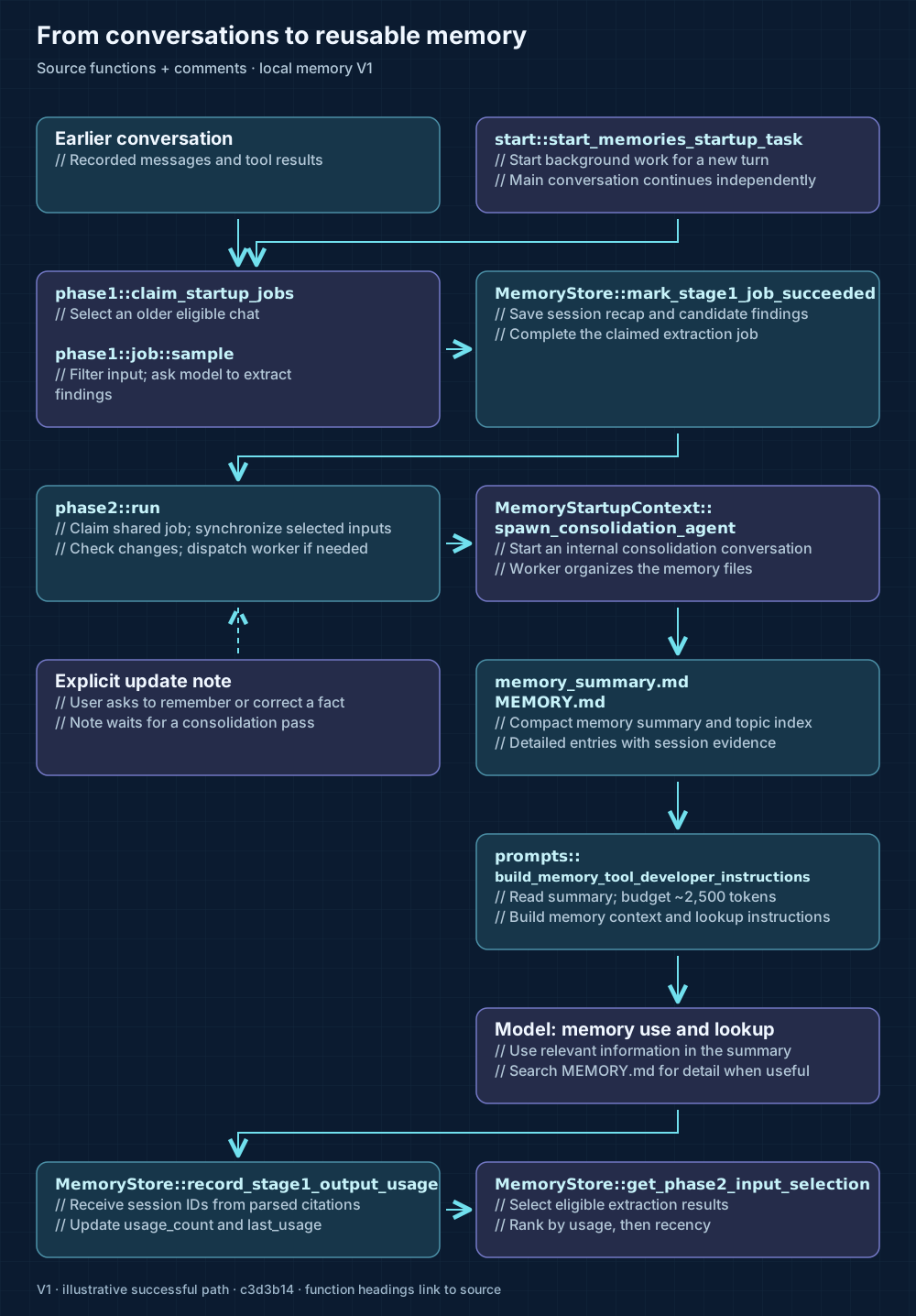
Open the V1 memory flow at full size.
Function names link to their definitions; // comments describe each step. We start with the turn that launches background processing.
1 Starting the background memory job
Our context engineering blog post explains how user input reaches the core in the embedded CLI path:
Terminal UI → turn/start → app-server → core input queue → RegularTask::run → run_turn
After the core reports a newly started turn, TurnRequestProcessor::turn_start_inner can call start_memories_startup_task. The highlighted lines at the call site require input, a newly started turn, and a configured primary environment:
if turn_has_input && started {
    let config_snapshot = thread.config_snapshot().await;
    if config_snapshot.is_primary_environment_configured() {
        codex_memories_write::start_memories_startup_task(
            Arc::clone(&self.thread_manager),
            Arc::clone(&self.auth_manager),
            thread_id,
            Arc::clone(&thread),
            thread.config().await,
            config_snapshot.permission_profile,
            &config_snapshot.session_source,
        );
    }
}
This applies to each new turn with input, including later turns in an existing conversation. Steering an already running turn sets started to false and skips this call. The startup function also returns early for disabled memories, ephemeral conversations, or child agents.
The async job launches at tokio::spawn, line 59. The highlighted lines below show the launch, database and quota checks, and the two stages:
tokio::spawn(async move {
    if context.memory_store().await.is_none() {
        warn!("state db unavailable for memories startup pipeline; skipping");
        return;
    }
    let root = config
        .codex_home
        .join(config.memories.version.directory_name());
    if let Err(err) = ensure_layout(&root).await {
        warn!("failed preparing memories root: {err}");
        return;
    }
    if let Err(err) = seed_extension_instructions(&root).await {
        warn!("failed seeding memory extension instructions: {err}");
    }

    // Clean memories to make preserve DB size. This does not consume tokens so can be
    // done before the quota check.
    phase1::prune(context.as_ref(), &config).await;

    if !guard::rate_limits_ok(&auth_manager, &config).await {
        context.counter(
            MEMORY_STARTUP,
            /*inc*/ 1,
            &[("status", "skipped_rate_limit")],
        );
        return;
    }

    // Run phase 1.
    phase1::run(Arc::clone(&context), Arc::clone(&config)).await;
    // Run phase 2.
    phase2::run(context, config, parent_permission_profile).await;
});
The startup function returns without awaiting this task, so the current conversation continues independently. Inside the task, the .await calls order Phase 1 extraction before Phase 2 consolidation. The quota guard can stop work before extraction when known remaining Codex rate limits fall below the default threshold of 25 percent.
Loading saved context does not wait for this background job to finish. A new conversation can therefore begin with the previously saved summary. We now follow how Phase 1 selects earlier chats for extraction.
2 Extracting findings from earlier chats
Phase 1: extraction selects eligible earlier sessions through claim_startup_jobs. Its database query excludes the current conversation and chats that are not enabled as memory inputs.
At this commit, the defaults allow up to two session claims per pass. The query’s age window uses each chat’s last recorded update: it must fall within the past ten days and be at least six hours ago.
The database then checks whether each candidate session has changed since its last successful extraction. Unchanged sessions are skipped; a temporary claim, or lease, gives a worker ownership of each extraction job.
For each claimed session, job::sample loads its recorded conversation, called a rollout in the code, and asks an extraction model to summarize it in a specified JSON format. V1 filters the recorded items and redacts recognized secrets before sending the input.
The extraction prompt prioritizes user requests and corrections that reveal useful preferences. A shortened illustrative response uses the fields required by the V1 output schema:
{
  "rollout_summary":
    "Blog revision: user clarified preferred introductions, examples, and titles.",
  "rollout_slug": "blog-writing-style",
  "raw_memory":
    "Blog style: short introductions, familiar examples, and titles without Explore."
}
rollout_summary is the session recap; raw_memory carries candidate reusable knowledge. rollout_slug can help name the recap. StageOneOutput::parse decodes the result and redacts the generated fields too.
The success path stores these values in the database for consolidation. Even if no sessions qualify for extraction, the background task proceeds to Phase 2, which can use previously extracted results or explicit update notes.
3 Building the memory files
Phase 2: consolidation, implemented by phase2::run, combines selected findings into shared memory files. It first claims the global job to coordinate writers. An existing lease, retry delay, or cooldown can defer the pass; the success cooldown is six hours at this commit.
After claiming the job, phase 2 selects extraction results, writes the inputs into the memory folder, and computes a Git diff. For V1, those inputs include candidate findings in raw_memories.md and session recaps in rollout_summaries/. The diff shows what changed since the previous consolidation. If nothing changed and the required output files are valid, the stage can finish without a model call.
If consolidation is needed, Codex starts a model-powered worker to organize the inputs. spawn_consolidation_agent creates an internal MemoryConsolidation conversation and submits the task. phase2::agent::handle tracks completion in a separate task, so phase2::run(...).await can return before the worker finishes.
With Codex-managed sandboxing, the worker’s configuration limits writes to the memory folder and disables network access. It preserves a parent’s disabled or externally managed sandbox instead. In all three cases, it disables the worker’s own memory use and generation, keeping the consolidation conversation out of future extraction.
The resulting V1 memory folder has several layers, from a compact summary to detailed evidence:
| File or folder | Purpose |
|---|---|
memory_ | A short summary of preferences and an index of available topics. |
MEMORY.md | Detailed reusable knowledge, grouped by task or project. |
rollout_ | Recaps of earlier sessions and pointers to their evidence. |
skills/ | Optional procedures for recurring work. |
An illustrative MEMORY.md entry follows the task-grouped format; evidence metadata is omitted here:
# Task Group: /work/blog writing style

scope: Drafting and revising the author's blog posts.
applies_to: cwd=/work/blog; reuse_rule=use for this author's blog drafts

## Task 1: Revise a blog draft, style preferences clarified

...

### keywords

- blog, writing-style, introductions, examples, titles

## User preferences

- For blog drafts, the user asked to "keep the introduction short". [Task 1]
- Use concrete, familiar examples. [Task 1]
- Avoid "Explore" in blog titles. [Task 1]
Scope and keywords guide the model’s retrieval; they do not isolate memory by project in the runtime.
After the worker finishes, the completion handler validates its output and checks that it still owns the lease before saving the new workspace baseline. V1 validation checks file structure, including the summary’s v1 header, and rejects symbolic links. It does not test the factual accuracy of each entry.
Once consolidation completes, the generated memory files are available for later conversations. The read path begins when Codex builds a conversation’s initial context.
4 Loading saved memory context into a new conversation
When Codex builds a new conversation’s initial context, it automatically loads memory_summary.md and memory lookup instructions, provided the memory feature and use_memories are enabled and the saved summary is readable and nonempty.
The V1 summary contains preferences the model can apply directly and a topic index for finding more detail. Codex loads this existing summary regardless of the opening request’s topic; the loader does not take the user’s request as input.
This connects to the initial-context step in our context engineering blog post. Inside turn::run_turn, context assembly asks registered extensions for context. MemoriesExtension::contribute_thread_context calls build_memory_tool_developer_instructions. The highlighted lines show the file read, truncation, and empty-summary check:
let base_path = codex_home.join(version.directory_name());
let memory_summary_path = base_path.join("memory_summary.md");
let memory_summary = fs::read_to_string(&memory_summary_path)
    .await
    .ok()?
    .trim()
    .to_string();
let memory_summary = truncate_text(
    &memory_summary,
    TruncationPolicy::Tokens(MEMORY_TOOL_DEVELOPER_INSTRUCTIONS_SUMMARY_TOKEN_LIMIT),
);
if memory_summary.is_empty() {
    return None;
}
The budget is 2,500 estimated tokens, using byte-length estimates and preserving the beginning and end. A failed file read or empty summary produces no memory instructions. Otherwise, the builder wraps the summary in the lookup template.
The extension contributes this text as developer instructions. Codex records it in conversation history, which becomes part of the input passed to turn::build_prompt. Ordinary later turns reuse the recorded context; this is not a fresh summary read before every model call.
The model now has a compact starting context. Detailed MEMORY.md entries remain on disk; section 5 follows how the model decides whether to read them.
5 Retrieving relevant memory
The model decides when to retrieve more detail. V1’s lookup instructions ask it to consult memory for requests related to saved topics or earlier decisions. Clearly self-contained requests can skip lookup; uncertain cases should get a quick memory pass. This can happen during any turn where memory guidance is available.
With V1 selected and /home/engineer/.codex as Codex home, the prompt gives this lookup sequence:
Quick memory pass (when applicable):

1. Skim the MEMORY_SUMMARY below and extract task-relevant keywords.
2. Search /home/engineer/.codex/memories/MEMORY.md using those keywords.
3. Only if MEMORY.md directly points to rollout summaries/skills, open the 1-2
   most relevant files under /home/engineer/.codex/memories/rollout_summaries/ or
   /home/engineer/.codex/memories/skills/.
4. If above are not clear and you need exact commands, error text, or precise evidence, search over `rollout_path` for more evidence.
5. If there are no relevant hits, stop memory lookup and continue normally.
These are model-directed tool calls. By default, dedicated_tools = false, so the model can use ordinary shell and file tools. Enabling it adds tools scoped to the memory folder. The prompt suggests four to six search steps to keep a quick pass lightweight.
Retrieved text returns through the tool-result loop in our context engineering blog post. turn::drain_in_flight records the output in conversation history, and the next model call receives that history, including the retrieved evidence.
For facts that may have changed, the verification instructions ask the model to verify them when doing so is cheap. I would also treat saved preferences as a starting point and follow new directions for the current task.
When retrieved memory informs the answer, V1’s citation instructions ask the model to identify what it used. The next section follows how those citations influence future memory selection.
6 Tracking which memories get used
When the model uses retrieved memory, the V1 memory prompt asks it to finish its answer with an <oai-mem-citation> block. This markup identifies the memory-file lines it used and the earlier sessions that supplied the evidence.
Codex parses the hidden citation markup, then record_stage1_output_usage_for_memory_citation passes valid session identifiers to the memory database when it is available. record_stage1_output_usage executes the SQL below. The highlighted lines increment the use count for a cited session’s extraction result and record when it was used:
UPDATE stage1_outputs
SET
    usage_count = COALESCE(usage_count, 0) + 1,
    last_usage = ?
WHERE thread_id = ?
Future consolidation passes use that feedback when selecting extraction results. The default recency window is 30 days: the check uses the last recorded use, falling back to the source’s last update if the result has never been used. Eligible, nonempty results from enabled chats are ranked by usage count, then recency, and up to 256 are selected by default.
A file read alone does not update the count, and a citation does not guarantee permanent retention.
Explicit user corrections supply another input to consolidation: update notes.
7 Updating memory on request
An explicit request to remember, correct, or forget something reaches the model as an ordinary user message. With memory guidance loaded, the V1 instructions direct it to write a small Markdown note under extensions/ad_hoc/notes/, leaving generated files alone. Note creation is a model action, rather than an automatic runtime response to the words “remember this”.
The model can use ordinary file tools or, with dedicated tools enabled, AddAdHocNoteTool (memories.add_ad_hoc_note). An illustrative note contains:
For future blog drafts, keep the introduction to one paragraph.The note-writing backend saves the file without launching consolidation or updating the summary. The current model already knows the correction from our message; future conversations receive the generated summary, not pending notes.
A background pass can incorporate the note during Phase 2 consolidation. Notes enter this stage directly, so their contents do not depend on Phase 1 rediscovering the request. The startup task still reaches Phase 2 even when Phase 1 finds no eligible chats. The worker’s note-processing instructions tell it to incorporate new or edited notes, keep their files, and tag derived information with [ad-hoc note].
Timing depends on when the pass sees the note: it may compute its workspace diff before the model writes the file. Leases and cooldowns, together with the quota guard, can delay processing further. Saving a note does not promise an updated summary in the same turn or the next one.
V2 keeps this update mechanism while changing what extraction produces and how consolidated memory is organized.
8 Exploring V2
V2 is version 2 of Codex’s local memory pipeline. It changes how earlier chats are extracted, how their findings are organized, and how later conversations retrieve them.
Keep memories enabled and select V2 in config.toml:
[memories]
version = "v2"
V2 uses memories_v2/, alongside V1’s memories/. The optional dual_write = true starts background pipelines for both versions; the read extension still uses the selected version. Generating both does not combine their context in a new conversation.
8.1 Extracting session history
V2 keeps extraction followed by consolidation. Within Phase 1: extraction, the first important change is how rollout_input::serialize_tiered_input chooses evidence for the extraction model. Under a limited input budget, it prioritizes human messages over assistant and tool material, chooses newer evidence first within each category, then renders the selected items in their original order.
V2’s extraction prompt asks for a faithful account of the session, distinguishing the user’s words from agent suggestions and preserving the scope of preferences.
The V2 output schema requires just rollout_summary and a string rollout_slug. A shortened illustrative result is:
{
  "rollout_summary":
    "Future blog drafts: short intros, familiar examples, no Explore titles.",
  "rollout_slug": "blog-writing-style"
}
V1 extracts a separate raw_memory as well; V2 carries the session account forward without that field. The V2 parser redacts generated fields and applies a 9,000-byte truncation policy to the recap. That recap becomes the input for V2 consolidation.
8.2 Building a compact summary
V2 also uses Phase 2: consolidation, through the same phase2::run function. Its input synchronization writes selected session recaps into rollout_summaries/ for both versions, but rebuilds raw_memories.md only for V1. The worker then receives the version-specific consolidation prompt.
The files have different roles in each version:
| Memory role | V1 | V2 |
|---|---|---|
| Inputs from extraction | Recaps and raw_memories.md | Recaps; no raw-memory file to rebuild. |
| Generated knowledge | MEMORY.md and a short summary | A compact memory_ |
| Routes to detail | Topics and keywords | Exact recap filenames and session identifiers |
V2’s worker is instructed to keep reusable, user-supported preferences in the summary and preserve single-task decisions with their tasks. It must ground its claims and pointers in supplied evidence. A complete illustrative summary could look like this. The session identifier is fictional, and the recap filename follows the source naming rules:
v1

## User Profile

Writes blog posts in /work/blog.

## User preferences

- For future blog drafts, keep introductions short.
- Use concrete, familiar examples; avoid "Explore" in blog titles.

## General Tips

## What's in Memory

### /work/blog

#### 2026-10-09

- rollout_summaries/2026-10-09T12-00-00-0001-blog_writing_style.md —
  User feedback on blog introductions, examples, and title wording;
  thread_id=01a12088-d200-7000-8000-000000000001
The v1 first line is intentional: V2 validation still requires that literal header, along with the four headings shown above and a file smaller than 10,000 UTF-8 bytes. The config selects the pipeline version; the file header does not. V2 does not require a MEMORY.md artifact. These checks verify structure, not whether the worker’s account is true.
V2 puts direct recap routes in the injected summary, so detailed retrieval can begin from those pointers.
8.3 Reading through direct pointers
V2 uses the same summary loader and budget of 2,500 estimated tokens as V1. Its lookup instructions route the model directly to referenced session recaps, rather than starting with a keyword search in MEMORY.md. With /home/engineer/.codex as Codex home, the V2 template opens with:
Use the injected MEMORY_SUMMARY as historical context: apply the user's actual
preferences, corrections, decisions, and supported task scope. Its exact
rollout, source, pull-request, discussion, and document pointers can guide
independently useful work without an extra lookup merely to rediscover them.
Read a matching rollout under `/home/engineer/.codex/memories_v2/rollout_summaries/` when its
additional evidence, wording, chronology, or uncertainty could change your
answer; otherwise do not retrieve history speculatively. Search selectively
when a genuinely needed route is missing.
The extension splits the rendered developer instructions into fragments of at most 8,900 bytes at UTF-8 boundaries. The summary budget applies before template rendering and fragmentation.
V2’s citation rule requires a read session recap to inform the answer and excludes memory_summary.md. Recap citations can feed the usage tracking from section 6; applying injected preferences alone does not produce that feedback.
Explicit updates follow the same note-writing guidance under memories_v2/extensions/ad_hoc/notes/, with the consolidation timing explained in section 7.
What stands out in Codex’s design
What stands out to me is the boundary between runtime coordination and model judgment. The runtime schedules background work, validates file structure, and supplies memory context. The models decide what findings mean, how to organize them, and when earlier evidence is useful. The files and prompts make those decisions inspectable, while their quality still depends on faithful extraction, consolidation, and retrieval.
I would keep required project rules in AGENTS.md or checked-in documentation, as the official guide recommends, and use memory to carry context from earlier work.
Our earlier blog post, CodeX Architect Part 1 - Context Engineering, covers how Codex assembles the context for a model request. Continue with CodeX Architect Part 3 - Subagents to follow how the main model delegates a task, how the child works, and how its result comes back.
Questions, corrections, or follow-up ideas are welcome on GitHub Issues.